
There comes a point with all good things when “too much is too much.”
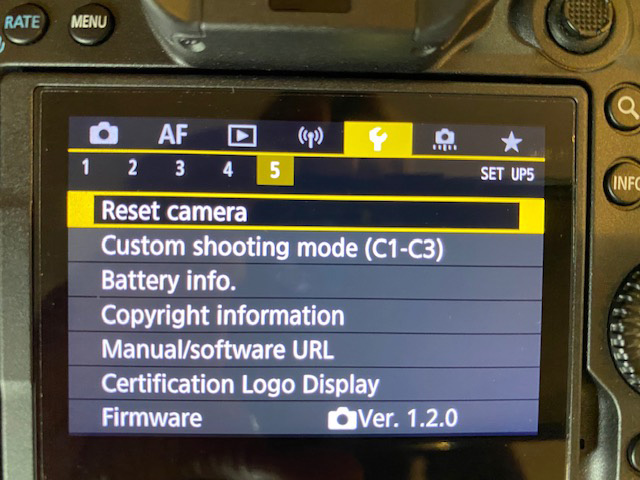
Yep, same applies with camera settings. I’ve seen camera settings get tangled over the years and the only resort is to reset the camera.
This might sound like a drastic measure but it’s really not. The reset button returns the camera to factory settings. Everything is cleared out and we can start from the beginning.
Recently two friends complained that their Canon R5 had simply stopped taking good pictures. EB complained that his R5 was producing soft images. PE complained that her R5 was giving soft and noisy images.
EB called Canon and the technician suggested pushing the Reset button. After EB pushed the Reset button, the camera was back to producing lovely images.
When PE complained about her soft and noisy images I told her about EB’s experience. I also sent an email to Canon Professional Services to see what they thought about the Reset option.
“The EOS R5 does have a lot of features built into it to where the user is able to customize it for their own shooting needs. There may be some features which may change the way the camera takes pictures and sometimes if the wrong setting is set on the camera, the results may not be what some photographers are looking for. At least clearing the settings will restore the camera’s settings back to default, allowing the photographer to begin with a clean slate to customize the camera for their shooting needs.”
Canon Professional Services
I’ve seen the Reset button used over the years with great success. RE had pushed so many buttons on his Canon 600 flash that reset was the only way to make it work again. Students in class have had to resort to the Reset button when a hodge-podge of features had been set on their camera by “helpful” friends or spouses.

Our new mirrorless cameras come with settings, menu options, and features that we never dreamed of 20 years ago. It’s tempting to select everything when we first get the camera based on blog posts, friend’s advice, and YouTube videos. Yep, been there and done that.
The Reset button might be the solution when things get tangled and the camera stops producing great results.
Olympus puts their Reset button under the camera menu. Sony puts their Reset under the tool box menu.
I pass along my experiences so you’ll have a great time with your camera. Cheers!

 Kathy Adams Clark
Coming out with some good advice, I don’t think I’ve messed up my camera enough to need reset, but I can see it as a possibility at some point!
LikeLike
Use the Reset button if the camera stops functioning as it should. Always nice to know the Reset is there. Thanks for the comment!
LikeLike
Hi Kathy. I think I am one of those people that took too much you tube advice and cant get good images. I think I set something unknown that is causing a conflict and most images are soft? My problem now is under reset camera (R7) there is a list of options to reset. I dont know which other options to reset. I reset my camera and C1 C2 C#, yet the back button focus is still changed the way I set it. I want the camera to be the way it was when I bought it. I probably should stay away from copyright info since I dont need to redo that and not sure that causes soft images. I just updated all firmware on this R7 and RF 100-500mm. Gets confusing. If this reset doesnt work, I am sending both back to Canon. I am not sure why I can capture the cat in my back tard and it is sharp enough to count whiskers. Then a bird in a tree above the cat has a soft eye even though the camera eye focus locked on? Thx
LikeLike
I feel your pain. Yes, reset the Basic. The Other Options get more complicated. Keep your Copyright information as that has your name in the photos. You want that. Clear out C1, etc. if you’ve added anything there. Then look at the basics of shooting. Maybe that’s why your birds are not clear. Do you have IS turned on in the body of the camera? That’s a good thing and gives you IS in the body as well as in the lens. Are you holding the camera steady? The cat on a horizontal plane with the camera is easy. Aim your camera overhead and then get shakey. You might need a higher shutter speed for the bird overhead. Pay attention. Then is the bird’s eye the point of focus or is focus on the branch nearby? I suspect it’s not having a high enough shutter speed and not holding the camera nice and steady. Try those and see if they help. Good luck and keep asking questions!
LikeLike
Thank you for the reply young lady. I follow various pro birders and a couple of them said turn in camera IS off and since I had it on with all the soft focus, I tried their advice and turned ID off. I guess you are saying turn it back on. I have been shooting birds for many years and have only had these soft images in mirrorless years. I could always get sharp images with my 5D3 with my 100-400 mark 2. I concentrate holding my camera solid especially thinking about that being the possible cause of soft images. I normally shoot migrating geese at 1/3200 at f8 and whatever ISO I need to make that work depending if sunny or cloudy. One thing I havent tried, stick my old rf 300 f2.8 with adapter on this R7 to see what I get. Maybe I can eliminate the camera as the problem and just send the lens back? I wish I could find a nice newer 300 or 400 for my low light sports shooting. Canon does not even have a fast 300 anymore and the RF 400 is 12-16K? I would love the RF 100-300 f2.8 but dont have 10K laying around. Thanks for your time.
LikeLike
It could be the lens. I’m using the 100-500mm RF lens with a 1.4x and it is super sharp. Even in low light it’s sharp. I’m not thinking about big 2.8 or f/4 lenses anymore. We don’t need the light since we have high ISO. Maybe this is a lens issue?!
LikeLike
Thanks again Kathy. I am not done testing. I split up the R7 with the 100-500. I put the 100-500 on my R6 but havent had a chance to test it. I plan on putting my R7 with adapter on my old ef 300 f2.8 to see if there is any image problems. Hopefully once I get out to shoot, I will have my answer on what needs to be sent back to canon. Thx
LikeLike
Sounds like a great plan to me. Keep me posted!
LikeLike